

Black Friday is Friday 27 November this year. If you’re planning a deal, your Google Business Profile is one of the first places local customers will see it. But after Google’s policy change last month, I’ve heard a few business owners say they think offers are now banned on Google altogether.
They’re not. You just need to put them in the right place.
Offers can’t go in your description any more
In October I wrote about what Google told you to take off your Business Profile. Google’s Maps content policy now says your listing itself shouldn’t contain “time-bound promotions, pricing, or direct calls-to-action”. So “20% off this Black Friday” in your business description is out.
The same policy is clear about posts, though: “Offers and updates that may be seen as promotional or commercial content are otherwise permitted in posts.” Search Engine Roundtable picked up the change at the time.
So the rule of thumb is simple. Your description says what you do. Your posts say what’s on.
But they can still go in a post
I can vouch for this one personally. I published an Offer post for a client yesterday, and the option is still there in the usual place.
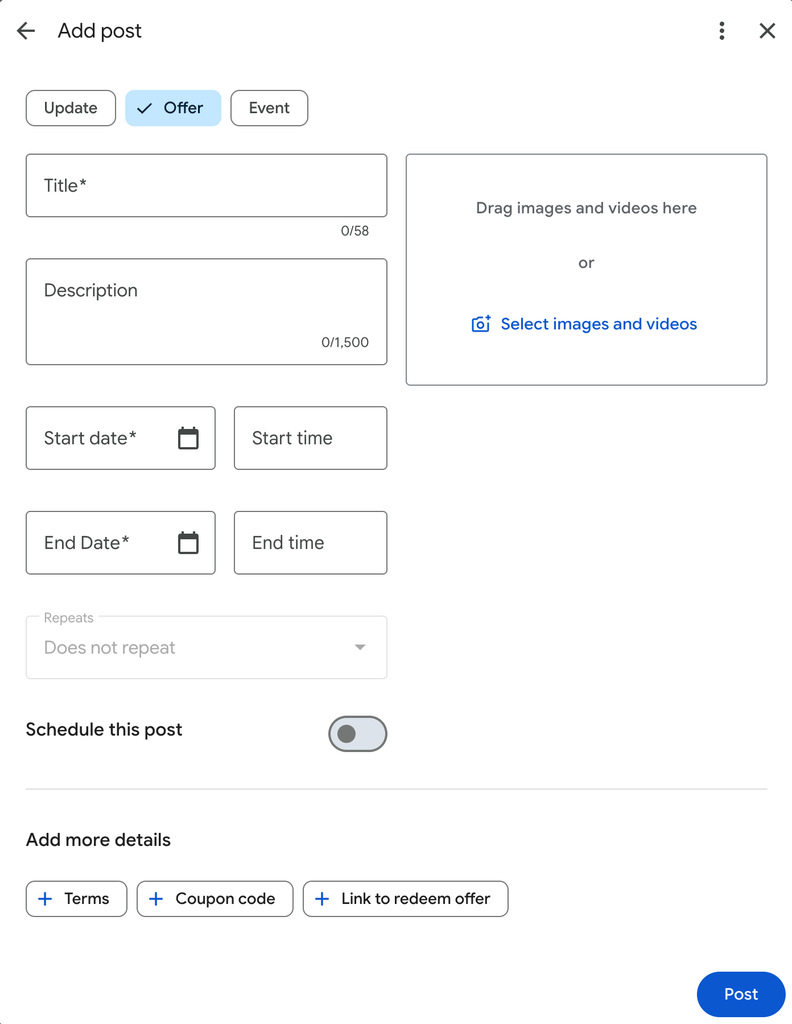
An Offer post is one of the post types you can choose when you add an update to your profile. It’s built for exactly this kind of thing: a deal that runs for a set period and then ends.
Getting your Black Friday deal up
- Search for your business name on Google while signed in, or open your Business Profile.
- Select Posts > Add Post, then choose Offer from the post types displayed at the top (it will default as an Update if you don’t)
- Give it a clear title, such as “Black Friday: 20% off all services” and add a short description.
- Add the dates your offer runs. Make sure the end date is the real end date.
- Add a photo. Your own photo of your shop, your team or your product works better than a stock image.
- Under Add more details select Terms if you need to add any conditions to the offer. If it’s a minimum spend or selected items only, say so.
- Don’t forget to add the link back to your Black Friday page on your website. Select Link to redeem offer to add the details
- Finally, select Post and you’re done.
Don’t get your post taken down
Phone numbers and email addresses in the text. The policy says posts can’t include email addresses, phone numbers, social media links or links to unrelated websites. Since September, Google has also said it may remove posts with unverified contact details. Use the button instead, and let people find your number on your profile.
Deals that don’t really end. If your Black Friday offer quietly rolls into a “Cyber Monday” offer, then a “Christmas” offer, that’s the kind of fake urgency the CMA has been fining businesses for. I covered that in my post on hidden fees and CMA fines. Keep the dates honest.
Leftovers in your description. While you’re in there, read your business description. If last year’s offer is still sitting in it, take it out.
Did anyone actually see it?
Google now shows how many people viewed each post, so after Black Friday you can see whether your offer reached three people or three hundred. Compare it with your normal updates and you’ll know whether offers are worth repeating at Christmas.
If you’d rather someone else looked after your profile, my Google Business Profile management starts at £79 a month, and I’ll do a free audit first.
Will Beavis runs Sharpstones Media, an independent PPC agency in Shrewsbury. Wondering if your Google Ads are wasting money? Take the free 60-second audit.