
An email from Google landed in my inbox last week, and I suspect plenty of businesses running their own ads will never open theirs. From 12 October 2026, Google Ads will start reading the offers on your website and adding them to your ads for you. You’re switched on by default. Nobody asks you first.
What’s changing
Google calls it Automated promotions. Google says it will find promotions like coupons and deals on your website and apply them straight to your campaigns, with no setup needed on your part. The Google Ads help page gives examples such as “Buy one get one free” and “20% off on black sweatshirts”. So if there’s a deal on your landing page, Google can now turn it into a little promotion line under your ad.
Your campaign has to be a Search or Performance Max campaign, it has to have location assets linked (usually that means your Google Business Profile is connected), and it can’t already have a promotion asset of your own. If you’re a local business that’s linked your profile to Google Ads, there’s a good chance you tick all three boxes.
The feature was first spotted in accounts by Hana Kobzová of PPC News Feed and reported by Search Engine Roundtable on 7 September. As far as Relevant Audience could tell, Google didn’t put out a blog post about it.
Where I think people will get caught out
To be fair to Google, there are some safeguards. The help page says only live offers that haven’t expired get used, and each promotion runs for less than 24 hours before Google checks it’s still showing on your site. So an offer you take down today shouldn’t still be in your ads next week. Google adds that this will change once it can read start and end dates for offers.
The trouble is that a lot of offers never get taken down. I see this all the time on small business websites. The spring sale banner is still sitting on the homepage in October. The “10% off your first visit” code was meant for one newsletter. One branch had a deal that the others didn’t. If it’s on your website, Google can treat it as current.
Then there’s the small print. A promotion asset is a short line of text. If your offer has conditions, like a minimum spend, a members only price or “selected treatments only”, those conditions might sit further down the page or on a different page altogether. Relevant Audience flagged this too, along with the risk of a local offer being shown much more widely than you meant. On that point, Google’s help page says these promotions “may serve alongside your ads on Google Search or across Google’s broader ad inventory”. So it isn’t only people searching on Google who might see them.
And here’s the bit I like least. The Google email says promotions that have had zero impressions won’t show up in your account. So the first time you can see what Google wrote is after real customers have already seen it. The help page doesn’t mention any way to approve one before it goes live.
Why this matters more if you run your own ads
The email goes to whoever is signed up for account notifications, which might be you, a colleague who’s since left, or an inbox nobody checks. And because it’s switched on automatically, doing nothing means saying yes.
Responsibility is the other thing. The UK advertising rules, the CAP Code, say that “primary responsibility for observing the Code falls on marketers”. My reading is that if an ad promises a deal you won’t honour, “Google added it, not me” is unlikely to get you very far with an unhappy customer. I wrote about how pricing claims can land you in hot water in my post on CMA fines and Google Ads policies.
What I’d do this week
You’ve got two simple ways to stay in control.
Option one: turn it off.
- Sign in to Google Ads.
- In the left hand menu, click Campaigns, then Assets.
- In the filter bar near the top, click the three dots and choose Account level automated assets.
- On that page, click the three dots again and choose Advanced settings.
- Open the Automated promotions drop down and choose Off. Google may ask you why. Pick whichever reason fits.
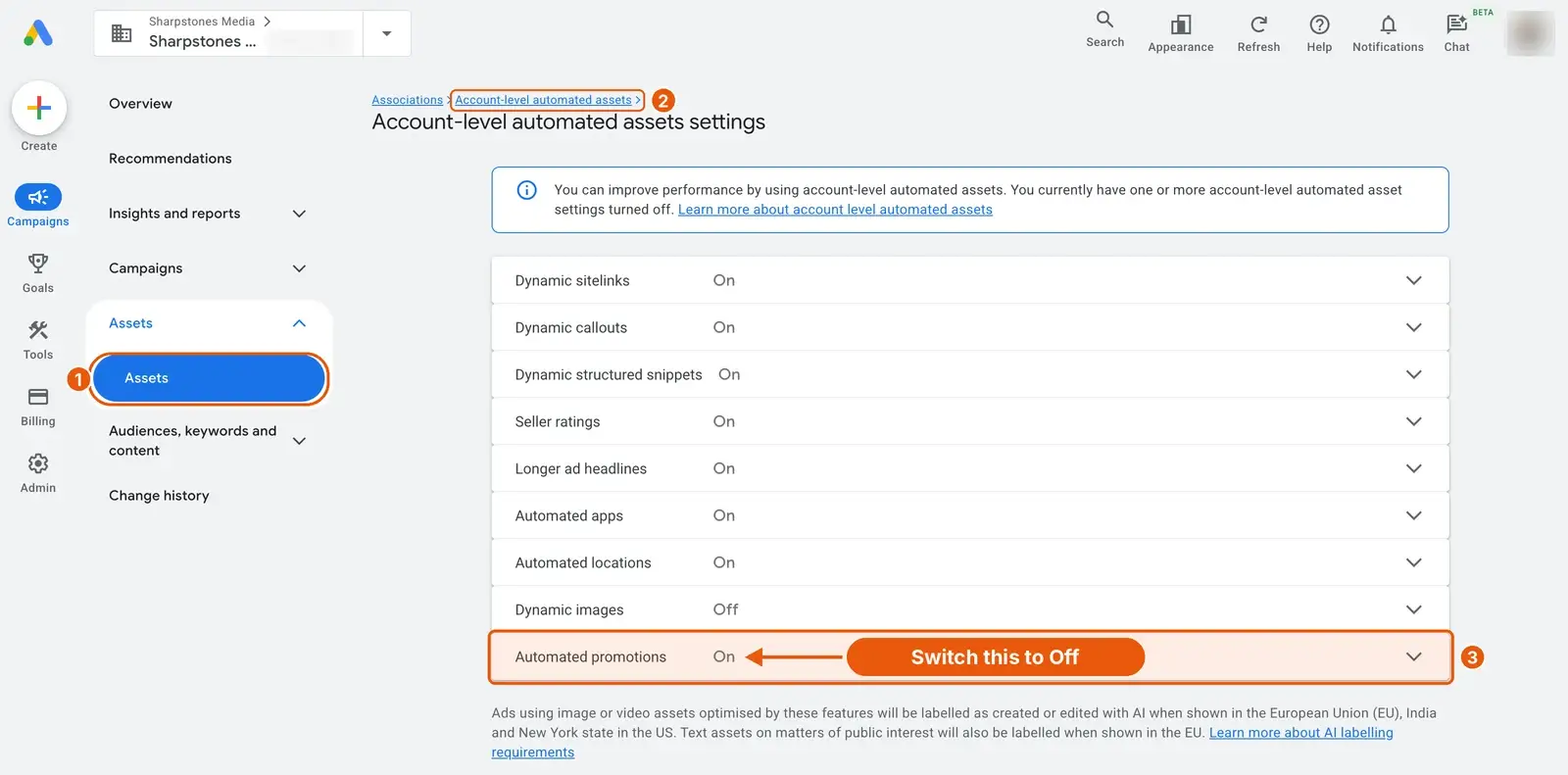
Option two: add your own promotion. Google skips any campaign that already has a promotion asset. If you’ve got a real offer you’re happy to stand behind, add it yourself. That way you choose the wording, the dates and the terms.
Whichever you choose, go through your website and take down anything that’s expired, especially with Black Friday and Christmas offers about to go up. And if you leave the feature switched on, check your Assets every week or so. Filter by Asset type, choose Promotion, and look for anything labelled Google AI in the Added by column.
Will Bing do the same?
Not yet, as far as I can find. Microsoft Advertising’s September update says nothing about automatic promotions in search ads. Microsoft already writes headlines and descriptions from your website in Performance Max, though, and Opteo has a guide to switching that off.
My guess is that Microsoft will follow sooner or later. We’ve seen this pattern before with AI Max, which Google launched first and Microsoft has since followed. I wrote about Bing’s version and Google’s latest AI Max changes recently. I’ll update this post if it happens.
The bigger picture
I’m not against automation. A good offer in an ad can lift your click through rate. But each of these changes hands Google a bit more of the writing, and with this one, your website effectively becomes your ad copy. If you haven’t looked at your site with a customer’s eyes for a while, now’s a good time.
If you’d rather someone kept an eye on this sort of thing for you, it’s what I do every day. Get in touch and I’ll happily take a look at your account.