
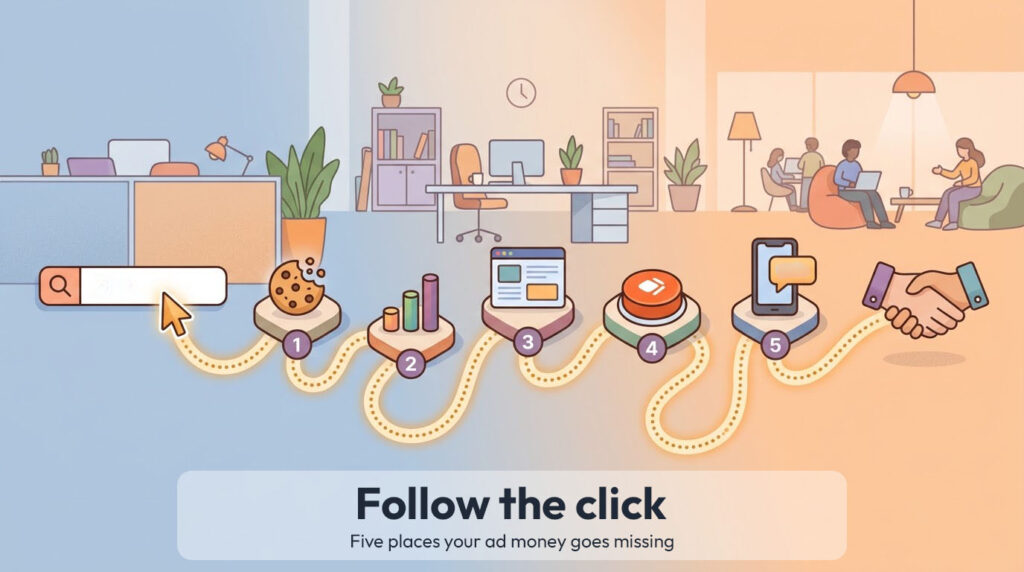
Picture this. Someone in Shrewsbury needs a new boiler, types it into Google or Bing and clicks your ad. You’ve just paid for that click. What happens over the next few minutes decides whether you get a customer or another line on your ad bill.
When businesses start out with paid search, nearly all the effort goes into the ad itself: the keywords, the headlines, the budget. But in my experience the money usually goes missing after the click, on the website and in the inbox. So let’s follow that one visitor through five stops.
Stop one: the cookie banner
The first thing your visitor sees is probably a cookie banner.
The ICO is clear that “if your service uses storage or access technologies for the purposes of online advertising, you must get consent” (ICO). Google’s own EU user consent policy applies to UK visitors too, and Microsoft goes further. Since 5 May 2025 it has required a consent signal for visits from the UK, EEA and Switzerland, warning that without one it “will impact your advertising performance” (Microsoft Advertising). And since 5 February 2026, the ICO has been able to fine businesses up to £17.5 million or 4% of global turnover for breaking the cookie rules, up from a previous maximum of £500,000 (ICO; legal briefing).
Get it wrong the other way and you lose data on the very people who said yes.
The fix: open your site in a private browser window, reject all cookies and check no advertising cookies are set. Then accept, and use Google’s free Tag Assistant or Microsoft’s UET Tag Helper to check your tracking springs into life. My 2 minute CMP check covers one common setup quirk too.
Stop two: the tracking
Say your visitor accepts cookies and fills in your form. Does your ad account know?
Google puts it simply. You choose what counts as valuable, such as a purchase, a sign up or a phone call, “and Google Ads will then help you to get the most out of your campaigns” (Google Ads Help). Microsoft Advertising does the same through its UET tag. If nothing is being counted, or the wrong thing is (a page view instead of an enquiry, say), you can’t tell which keywords bring in work, and any automated bidding is chasing the wrong goal.
I also regularly find paid clicks counted as organic in Analytics, which Google now flags with a warning.
The fix: run Tag Assistant or UET Tag Helper, send a test enquiry through your own site and check your conversion tags fire. Then check the status of your conversion actions in Google Ads and your conversion goals in Microsoft Advertising. If something’s wrong, sort it before you spend another pound.
Stop three: the landing page
Now your visitor is looking at the page your ad sent them to. Too often that’s the homepage, which is trying to talk to everyone about everything.
Google, for one, grades this. Landing page experience is one of the three parts of the Quality Score it shows you, described as “how relevant and useful your landing page is to people who click your ad”. It’s rated against other advertisers whose ads showed for the exact same search over the last 90 days (Google Ads Help). In my experience a generic homepage rarely comes out well.
The fix: send each ad to a page that matches what was searched for. If the ad says boiler servicing in Shrewsbury, the page should say boiler servicing in Shrewsbury. And if you show a price in your ad, make sure the page matches it, or you’re heading into CMA and Google policy trouble.
Stop four: the ask
Your visitor likes what they see. What do you want them to do next? If you have to think about it, so do they.
I see pages with a phone number tucked in the footer, a contact form three scrolls down and a “find out more” button that goes somewhere else. Every extra choice is another chance for someone to wander off.
The fix: pick one main action per page, make it obvious on a phone without scrolling, and use words that say what happens next. “Get your quote by tomorrow” tells people far more than “Submit”.
Stop five: the reply
This one hurts, because you’ve done everything right. The enquiry is in. And then it sits in an inbox until Thursday.
Earlier this year Workato filled in demo request forms on 114 B2B company websites to see what happened next. Only one company sent a personalised email reply within five minutes. Those that did reply by email took 11 hours and 54 minutes on average, and nearly one in five didn’t reply by email at all (Workato, March 2026). If companies asking for these enquiries are that slow, I’d bet plenty of local businesses are slower. Reply quickly and you could easily be first.
The fix: decide who picks up new enquiries, set up an instant alert to their phone and aim to reply within the hour during working hours. An automatic “thanks, we’ll call you this afternoon” email buys you some goodwill in the meantime.
The five minute test
Before you spend a penny, try this on your own site:
- Reject cookies. Do advertising cookies stay away?
- Send a test enquiry with Tag Assistant or UET Tag Helper running. Do your conversion tags fire?
- Open the page each ad links to. Does it match what people searched for?
- Look at that page on your phone. Is the next step obvious?
- Time how long it takes for someone to reply to your test enquiry.
If any of these trip you up, it’s exactly the kind of thing I sort out for clients. It’s also why I always look at the website, not just the ads. Get in touch for a free audit and I’ll show you where your clicks are leaking.