
On 28 October, Google said it plans to bring ads in AI Mode to the United Kingdom in the last quarter of 2026. It’s already live in the US and ten other countries, including Australia, Canada and India. There’s no UK date yet.
If you run Google Ads, you don’t need to do anything for your ads to appear there. That’s the part I’d pay attention to.
What’s happening
AI Mode is the tab on Google’s results page where you ask a longer question and get a written answer back. It arrived in the UK in July 2025. Google says questions in AI Mode are, on average, three times longer than a traditional search.
Once ads arrive, they’ll sit inside those answers, marked “Sponsored”. According to PPC Land’s report, existing Search, Shopping and Performance Max campaigns are eligible automatically, with no new setup and no separate budget.
Google is keen on this, but it isn’t all smooth for them either. On its earnings call the same week, Google’s chief business officer Philipp Schindler told investors that growth in AI Mode searches had an impact “because of the lower monetization we were seeing in AI Mode”. In other words, it’s earning less per search than normal results so far.
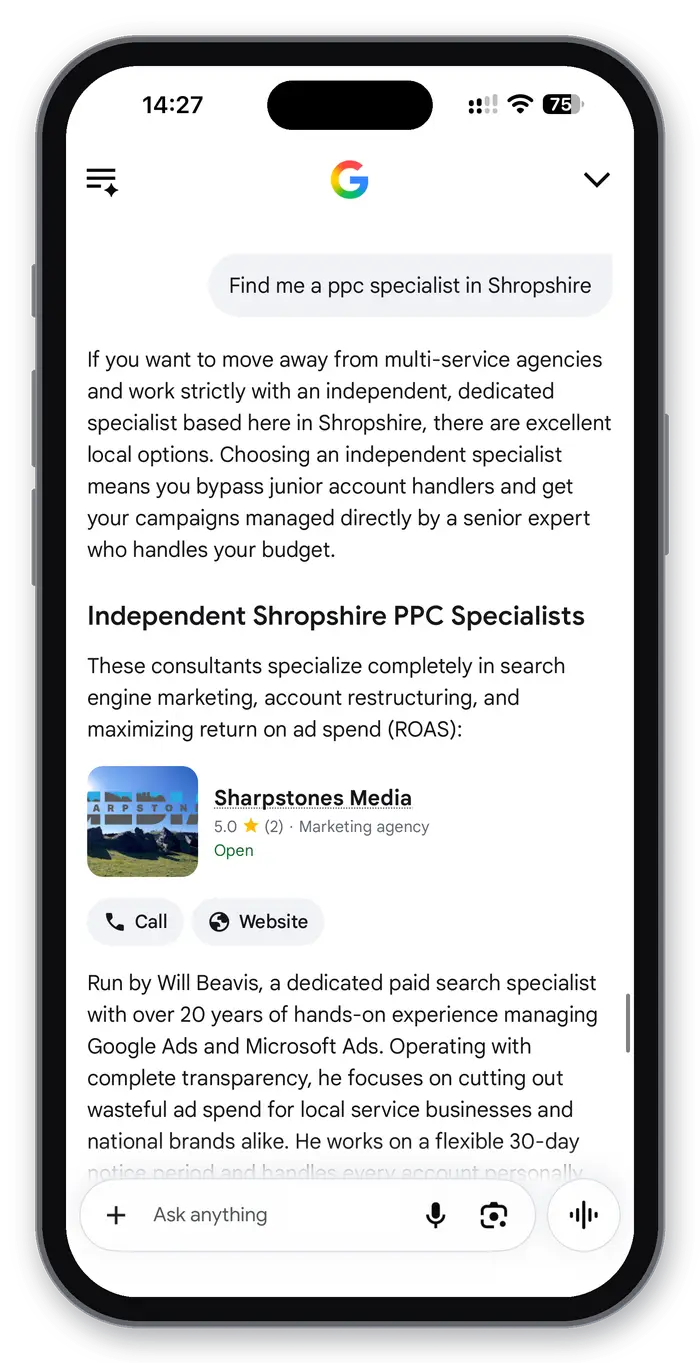
When I asked AI Mode to find me a PPC specialist in Shropshire, there were no ads in the answer yet. It did suggest me, which I’ll happily take. Once ads arrive, this is the space they’ll be competing for.
Three things you can’t control
- You can’t opt out. You can’t switch off AI Mode while keeping your normal Search ads, and you can’t target it on its own. Google’s help page says the same for ads in AI Overviews, the AI summary at the top of normal results.
- You won’t see it separately in your reports. For AI Overviews, Google says there’s no separate reporting yet. PPC Land reports that AI Mode clicks, costs and conversions are folded into your normal campaign figures too. So if your numbers move after launch, you won’t easily see whether AI Mode caused it.
- Your ad can be matched to the AI’s answer, not just the question. Google’s help page says ads shown inside AI Overviews have to match both the search and what the AI says. PPC Land reports the same approach in AI Mode. Broad match, AI Max, Shopping and Performance Max can be matched this way. Exact and phrase match keywords only show when the question itself is clearly about buying.
Here’s an example of why that matters. Someone asks “my boiler’s banging, is it safe to use?” and the AI’s answer suggests getting an engineer out. A broad match keyword could put your ad there, even though they never searched for an engineer.
What I’d check now
If you’re already running Google Ads, these are the things I’d do before AI Mode ads arrive.
- Take a note of your current figures. Write down this month’s cost per click, conversion rate and cost per lead. With no separate AI Mode report, a “before” picture is the simplest way to spot a change.
- Know which keywords are broad match. Those, and any campaign using AI Max, are the ones that can be matched to the AI’s answer.
- Tidy up your negative keywords. PPC Land says negative keywords and brand exclusions still apply in AI Mode. As you can’t opt out, they’re one of the few controls you have.
- Check your search terms report weekly. Watch for long, question style searches you wouldn’t have chosen.
- Make sure conversion tracking works. If Google’s automated bidding can’t see which clicks become calls or enquiries, it can’t steer your ads towards the right questions. My guide to tracking phone calls from Google Ads covers the calls part. If you’re on Smart Bidding, my post on Target CPA changes is worth a read too.
- Check your landing pages answer questions. Someone arriving from a detailed question wants a page that answers it. I wrote about what happens after the click here.
New to Google Ads? A quick guide to the words
AI Mode: the tab on Google where you ask a question and get a written answer.
AI Overviews: the AI summary that sometimes appears at the top of normal results.
Sponsored: the label Google puts on ads.
Match types: how closely a search has to match your keyword. Google’s own definitions: broad shows on related searches, phrase on searches that include your keyword’s meaning, exact on searches with the same meaning.
AI Max: a Google setting that lets its AI find extra searches and write ad text for you. I covered Google’s AI Max upgrade in September.
Negative keywords: searches you tell Google not to show your ad for.
Google’s free training site, Skillshop, is a good place to start.
My view
I don’t think this is a reason to panic, or to rush into anything. Google hasn’t said when it’ll happen, and it’s still working out how well these ads pay. What I would do is get your account tidy now, so that when AI Mode ads switch on, you can tell whether they’re helping or just spending.
If you’d like a second pair of eyes on your account before then, I’ve spent over 20 years in senior digital marketing roles and offer a free market audit. Have a look at my PPC management to see how I work.